
The legal profession is changing fast and so should your study habits
We’ve sifted through the growing list of legal tech tools so you don’t have to. Here are the 10 essential AI tools that law students and young lawyers can use to enhance research, writing, organization, and exam prep.
Let’s be honest about something: lawyers aren’t known for being the first to embrace new technology.
Walk into any law office and you’re more likely to see a bookshelf full of nineteenth-century law books and an octogenarian scribbling on a yellow legal pad than a standing desk with three monitors and color-coded Trello boards.
And when lawyers do try something new? Well, things can go sideways fast.
Case in point: a group of attorneys from Morgan & Morgan were recently sanctioned after filing a motion that cited eight fake cases—all apparently generated by an internal AI platform. The judge could only find one real case out of the nine cited. The rest were hallucinations, complete with “peculiar” legal standards and made-up caselaw.
The lawyers were fined $5,000, and one was removed from the case entirely. As the firm later said, “This serves as a cautionary tale for our firm and all firms, as we enter this new age of artificial intelligence.”
But here’s the thing: if you’re a law student or a young lawyer, this moment presents a huge opportunity. You’re entering the profession at a time when AI is reshaping everything from legal research to writing to contract review. If you learn to use it carefully—with appropriate skepticism—you can work smarter, faster, and stand out from your peers.
Here are 10 AI tools every law student and young lawyer should know about—and how to use them wisely.
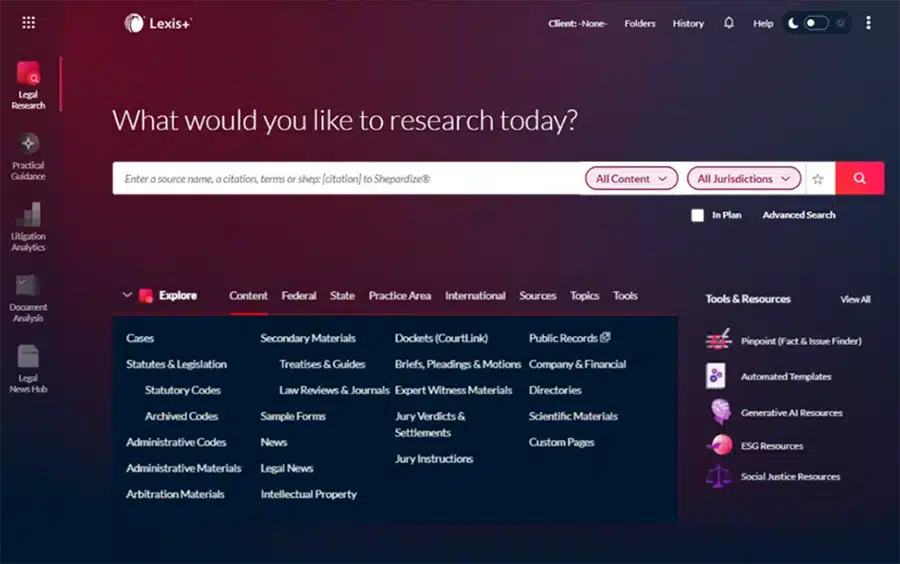
1. Lexis+ AI
Best for: Reliable legal research with trusted sources (especially if you prefer Lexis)
Lexis+ AI is—and this is important—probably the most reliable AI research tool on the market.
Unlike ChatGPT, Lexis+ AI is fully integrated with LexisNexis, one of the legal industry’s most trusted research platforms. That means every answer is backed by actual, citable sources—no hallucinated cases, no mystery footnotes.
If your school offers Lexis access (and most do), there’s no reason to wait. Start exploring its AI features early, especially the case summarization, conversational search, and brief analysis tools. Learning how to use them now will give you a real edge—in law school and beyond.
2. Westlaw Precision
Best for: Accurate legal research and judge/docket analysis (especially if you prefer Westlaw)
Westlaw Precision is Thomson Reuters’ flagship legal research platform, enhanced with AI-powered features like improved search accuracy, KeyCite flags, and tools to analyze judges, dockets, and litigation trends.
Like Lexis+ AI, Westlaw Precision is built on a trusted research program—but with its own interface and strengths. If your school offers Westlaw access (which it likely does), it’s worth getting comfortable with its AI tools now.

3. Casetext CoCounsel
Best for: Drafting, reviewing, and summarizing legal documents
CoCounsel was designed specifically for lawyers and trained on real legal documents—making it far more reliable than general-purpose AI tools. It can draft legal memos, review contracts, prepare deposition outlines, and even spot missing arguments.
Now part of Thomson Reuters, CoCounsel may be offered as a trial or in partnership with certain law schools.

4. ChatGPT
Best for: Explaining tough legal concepts, brainstorming, and creating study aids
ChatGPT isn’t built for legal work. As many lawyers have learned the hard way, it can hallucinate cases and get legal information wrong.
However, it remains one of the most versatile AI tools for law students. You can use it to explain difficult legal concepts in plain English, generate hypothetical fact patterns, create outlines, quiz yourself, or develop a study schedule.
Use it like a tutor or an assistant—not like a textbook.

5. Spellbook
Best for: Reviewing and editing contracts inside Microsoft Word
Spellbook runs on GPT-4 and lives directly inside Microsoft Word, offering real-time suggestions, clause comparisons, and redlines. It’s built for transactional work and contract review, and it’s especially useful during law school clinic work, internships, or summer associate projects.
While its premium version is aimed at law firms, some academic institutions or legal tech incubators may offer access or demos.

6. BriefCatch
Best for: Improving clarity, tone, and persuasiveness in legal writing
BriefCatch is a legal writing assistant trusted by judges, law professors, and litigators. Think of it like Grammarly—but trained for the legal field. It helps refine your arguments, eliminate passive voice, and enhance flow while preserving the appropriate tone for legal documents.
Great for polishing memos, seminar papers, or moot court briefs.

7. Jurisage
Best for: Quickly summarizing case law and extracting legal insights
Jurisage is a Canadian AI tool built specifically for legal professionals. It helps summarize lengthy opinions, highlight key holdings, and extract relevant facts and issues—all in a matter of seconds.
It’s still in development but may offer limited free trials. Worth keeping an eye on as tools like this become more widespread.

8. Notion AI
Best for: Organizing law school life—notes, outlines, schedules, and more
Notion AI isn’t designed for legal work, but it’s a powerful all-in-one workspace for law students. It can help you manage case briefs, to-do lists, outlines, and even automate flashcards or practice questions from your notes.
Perfect for staying organized during a hectic semester—especially if you like everything in one place.

9. BlackBoiler
Best for: Law students preparing for contract review work in internships or transactional law
BlackBoiler uses AI to review and redline documents based on a firm’s internal “playbook.” It’s used by major law firms and corporate legal departments to speed up routine contract review and negotiation—often by automatically suggesting edits and flagging risk.
You probably won’t use it in law school, but it’s worth knowing about—especially if you’re headed into transactional law. Contract review is one of the most common tasks assigned to junior associates and law students during summer internships, so understanding how automation is changing that process can help you stand out and adapt quickly.

10. Law School AI
Best for: Creating flashcards, practice questions, and study tools tailored to law students
Law School AI, billed as your “ultimate study partner” is a free tool designed specifically for law students. It helps generate flashcards, multiple-choice questions, and case briefs—all based on your study material or syllabus topics.
It’s much safer and more focused than general AI tools like ChatGPT, and because it’s built for law students, it avoids a lot of the irrelevant or inaccurate results you might get from non-legal platforms.
Great for final exam prep or testing yourself on tough concepts—just remember to always double-check AI-generated answers against your textbook or class notes.

The legal world has never rewarded stagnation. If you want to thrive in this profession, you have to adapt. That doesn’t mean trusting every AI tool blindly or cutting corners. It means learning how to use these tools to sharpen your thinking, speed up your workflow, and make better-informed decisions.
The best law students and young lawyers will use AI to accelerate their learning—not to replace it. Because in the end, it’s not about man versus machine. It’s about the lawyers who know how to use the machine—and those who don’t.

Why AI Isn’t a Substitute for a Personal Injury Lawyer
AI tools can help with legal info—but can they replace a personal injury lawyer? Here’s when you still need real legal experience on your side.